> For AI agents: the complete documentation index is available at /llms.txt, the full documentation bundle is available at /llms-full.txt.

# Promote or claim a skill you have created

Have you authored a skill in GitHub and want to promote it using Tessl? Tessl allows you to take a skill from a local repository or GitHub repository, and generate the plugin.json, which is essential for Tessl plugins and Skills. Once imported, you will publish the plugin to make it available, publicly or privately, to your teams. The following section discusses organization of your skills and how to publish them. Additionally if you have authored a plugin on GitHub that appears in Tessl, there is a section on [claiming that skill in Tessl](/distribute/promote-or-claim-a-skill-you-have-created.md#claim-a-tessl-skill).

## Prerequisites

- Tessl [installed](/introduction-to-tessl/installation.md)
- Tessl logged in
- Skill code available locally
- Access to a [workspace](/reference/workspaces.md)

## Mapping and importing your skills into Tessl plugins

If you've authored a number of skills and documents to help your agents, you can logically group the related files together and create individual skill plugins in Tessl. For example:

- If you're developing a "data migration" skill, place all the files related to that skill and documentation in a single folder or repository. This would be a single plugin.

<figure><img src="/gitbook-assets/image (137).png" alt="" width="375"><figcaption></figcaption></figure>

- Similarly if you've built a skill for "building a front end", that might contain best practices and design skills you would group them together into its own plugin, create the plugin.json, by running the import command, then lint, review, eval and publish the skill to your workplace.

<div align="center"><img src="/gitbook-assets/image (132).png" alt=""></div>

### Anti-patterns

To avoid performance issues and confusion of your agents, avoid throwing in the kitchen sink! Make your skill purpose built, providing the information for specific tasks.<br>

<figure><img src="/gitbook-assets/image (135).png" alt="" width="375"><figcaption></figcaption></figure>

## Clone the Repository

Clone your repository locally.

## Create a .tessl-plugin/plugin.json

- Create a [.tessl-plugin/plugin.json](/reference/configuration.md#plugin-configuration) (metadata describing it) by running the following command, with your workspace and folder location values:<br>

  ```
  tessl skill import ./<directory with SKILL.md> --workspace <myworkspace>
  ```

- You can add eval scenarios in the `evals/` directory at the plugin root, the directory that contains `.tessl-plugin/`. See [Prove a skill works using evaluation](/improving-your-skills/evaluate-skill-quality-using-scenarios.md).

## Improve your skill with Lint, Review, and Evaluate your Skill

### Review your Skill against best practices

Before publishing, validate your skill structure and contents:

```sh
tessl skill lint ./my-skill
```

This command checks:

- `SKILL.md` format and structure
- Required frontmatter fields (name, description)
- Conformance to the Agent Skills specification
- Markdown validity

To optimize your skill, run the following:

```sh
tessl review fix ./my-skill
```

Fix any errors before proceeding.

### Evaluate quality using Scenarios

Once you've built your skill the final step before publishing is to create scenarios your skill can be evaluated against. The following document illustrates how you would accomplish this:

- [Evaluate skill quality using scenarios](/improving-your-skills/evaluate-skill-quality-using-scenarios.md)

## Set up GitHub Action to publish to Tessl's Registry

The following steps introduce the [GitHub action](https://github.com/tesslio/setup-tessl) to your repository to publish your plugin automatically.

Using the GitHub action will automatically link your plugin to the repository, and all skills we previously indexed in the repository will be hidden and redirected to the plugins.\
\
See Tessl's [setup-tessl GitHub action](https://github.com/tesslio/setup-tessl) for additional options and information.

<div class="gb-stepper">

<div class="gb-step">

**Create your workflow**

Create your workflow file `.github/workflows/tessl-publish.yml`. [Here's an example action for auto-publishing](https://github.com/tesslio/setup-tessl?tab=readme-ov-file#publish-a-plugin-on-push).

</div>

<div class="gb-step">

**Create an API Key**

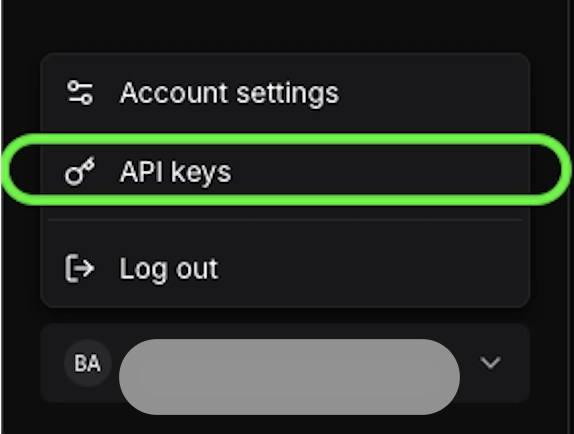
Log into [Tessl](https://tessl.io) on web UI. Open your workspace, navigate to **Settings**, then **API keys**. Create a new API key. Copy the value as it will only be shown once.
![](/gitbook-assets/image.png)

</div>

<div class="gb-step">

**Add your API Key as a Repository Secret**

In GitHub, navigate to your repo **Settings**, select **Secrets and variables**, under actions find **New Repository Secret**. Provide the name: `TESSL_TOKEN` and the value is the Tessl API key you procured in the earlier step.

</div>

<div class="gb-step">

**Run your workflow**

Kick off your workflow by running the relevant trigger, or manually triggering from the UI if you enabled that in your workflow definition.

</div>

</div>

## Claim a Tessl Skill

Found a skill in Tessl that is created/indexed from your Skill/GitHub repository of skills? You'll want to claim ownership and disable indexing by Tessl. To do this, you will:

- Recreate the skill in your workspace by importing it locally, update the workspace in `.tessl-plugin/plugin.json`.
- Use the [GitHub action to publish](https://github.com/tesslio/setup-tessl?tab=readme-ov-file#publish-a-plugin-on-push) , which will manage the Skill and ensure changes to the repo are reflected in your Tessl workspace and not reindexed by Tessl.

:::info

If you accidentally use the CLI to publish a skill to your workspace, and the skill was already indexed by Tessl in the Tessl workspace, you would find two versions, in two different workspaces, when searching for that skill. You can [contact Tessl support](/support/giving-feedback.md) to claim your plugin and address the duplicate. Be sure to set up the GitHub action as part of this.

:::
