

Removing the integration
GitHub Integration
To remove the GitHub integration, two steps are required:
1) GitHub: Uninstall Tessl Read-only, and Tessl App if you installed it, from within your GitHub Organization settings. An installation on your GitHub organization can serve more than one Tessl organization, so uninstall an app only when no other Tessl organization still uses it on that GitHub organization.
2) Tessl: Click the delete icon next to the integration and confirm.
GitHub removal
-
Navigate to Applications and click on Configure
 (1).png)
-
Scroll and click the option to Uninstall, completing the steps to Uninstall when requested.
 (1).png)
Tessl Removal
-
Select your workspace from the workspace switcher in the sidebar, below the organization dropdown.
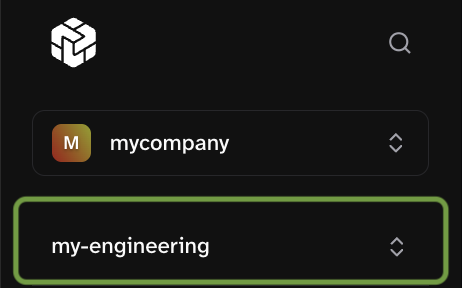
-
Open Settings in the sidebar, then select the Integrations section.
.

If the integration belongs to your organization rather than this workspace, the workspace Integrations section only summarizes it. Remove the connection from the organization dropdown at the top of the sidebar → Settings → Integrations → Manage. This route needs the organization integration-management permission.
-
Click the delete icon next to the GitHub integration, then click Uninstall in the confirmation dialog.

Gitlab integration
To remove the GitLab integration, two steps are required:
1) Tessl: Click the delete icon next to the integration and confirm.
2) GitLab, delete the integration token if it is no longer in use.
Tessl & GitLab removal
-
Select your workspace from the workspace switcher in the sidebar, below the organization dropdown.
-
Open Settings in the sidebar, then select the Integrations section.

.
If the integration belongs to your organization rather than this workspace, the workspace Integrations section only summarizes it. Remove the connection from the organization dropdown at the top of the sidebar → Settings → Integrations → Manage. This route needs the organization integration-management permission.
-
Click the delete icon next to the GitLab integration.
-
Enter in the requested value
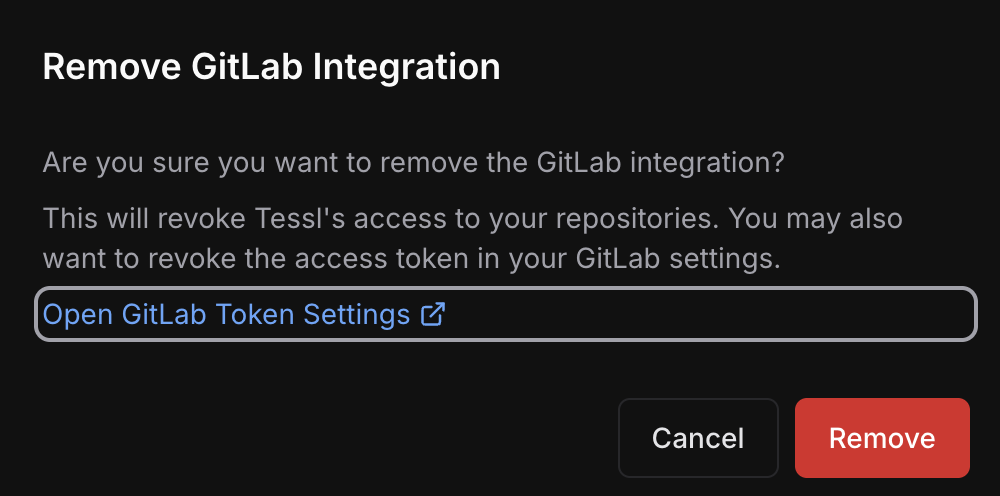
Gitlab removal
For security purposes, it is generally good practice to delete old tokens that are no longer used. Navigate to the correct token area in Gitlab and delete the token used for the integration
.png)